DIADvisor™

DIADvisor Base Station is a Microsoft Windows®-based application that collects, stores, analyzes and displays real-time hydro-meteorological and environmental data. The DIADvisor data collection base station receives ALERT formatted data via one or more serial ports on a local PC.

DIADvisor 3.0 includes the following:

  • Color Map support
  • ALERT2™ support
  • Windows 7 support
  • Customizable site icon and data displays
  • Alternate Rain Display Color Scheme
  • DIADvisor Migration tool to assist with upgrade detail
  • New FTP Client option to increase the historical period for rebuilding rain data time-series tables and overlay displays on start-up or after clearing data
  • Automated management of System Messages

Features

  • Ability to ingest data from external sources such as METAR, NWS and USGS via Contrail®, our secure 24x7 data service
  • Easily define alarms and notifications, combining real-time radar with traditional ground sensors
  • Seamless integration with Contrail® for distribution to authorized users via the Web
  • Enhanced charting and reporting capability
  • Free upgrade at term renewal for customers current with technical support fees

Enhanced protection features:

  • 24/7 system health monitoring 
  • Online data backup 
  • Automated problem notifications

Color Map Support 

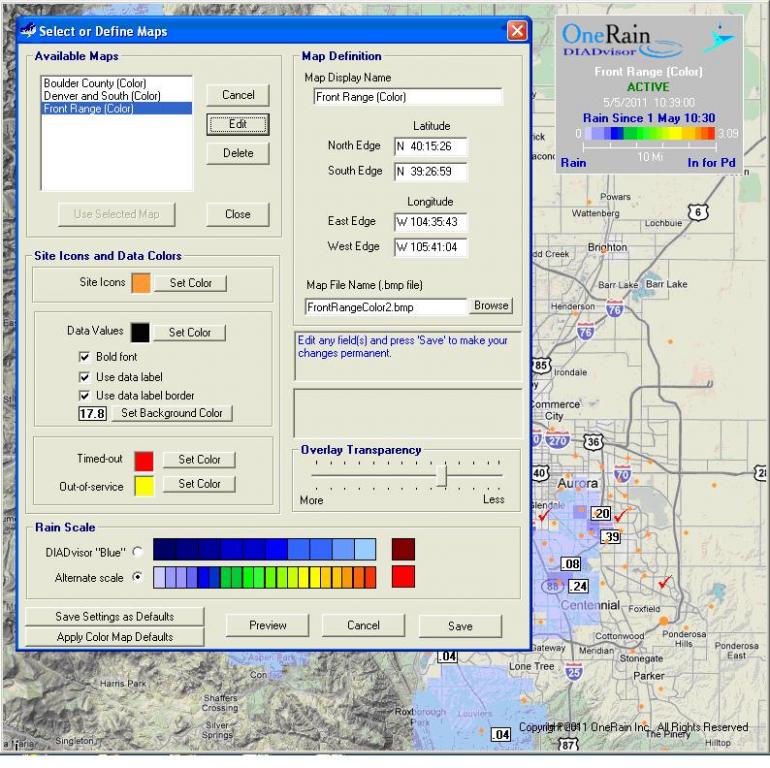
Color maps can be used in DIADvisor 3.0. The DIADvisor graphics engine has been re-designed to not require a black-background map in order to display the Rain Display overlays. Maps can be generated in JPEG or Bitmap formats using a wide variety of software, ranging from GIS packages to internet sources.

 DIADvisor

Custom Data Displays

DIADvisor 3.0 supports custom data displays. Using the DIADvisor “Define Map” user-interface, the following details can be customized:

  • Data value display – color, bold, borders, background color
  • Site icon colors
  • Timed-out site icon color
  • Out-of-service site icon color
  • Choice of two rain scale color schemes
  • Rainfall Overlay transparency level

These settings can be previewed and saved as the default map configuration. Saved configurations can then be applied to other maps with a click of a button.

DIADvisor and Contrail are trademarks or registered trademarks of OneRain Incorporated. ALERT2 is a trademark of the National Hydrologic Warning Council. Windows is a registered trademark of Microsoft Corporation in the United States and other countries.

Latest News

  1. B-Y-O-L Contrail® Training Workshop

    OneRain is pleased to invite you to a bring-your-own-laptop Contrail training workshop and tutorial session on Thursday, May 17th at the 2012 ALERT Users Group Conference in Reno, NV. This high-value training will be provided at no additional charge for registered conference attendees. AUG 24th Flood Warning Systems Training Conference and Exposition, May 15-18, 2012, brings together key people and government agencies with a common interest in flood warning and water resource management and planning.

    »
  2. Contrail Inventory now supports image upload from iOS devices

    With the release of version 1.31, Contrail Inventory enables iOS users to upload photos.

    »